

Updated 4 days ago
Best Fitness Tracker Apps: iOS vs Android Comparison 2026
youhong
Last Updated: January 2026 | Comprehensive Platform Analysis
Fitness tracker apps have evolved from simple step counters into sophisticated health management platforms that sync with wearable devices, analyze workout performance, and provide personalized coaching. With over 460 million global users projected for 2026, these mobile applications have become essential tools for anyone serious about health and fitness.
But here's the critical question facing every fitness enthusiast: Does your smartphone platform—iOS or Android—limit or enhance your fitness tracking experience? The answer is more nuanced than most people realize. While many popular fitness apps support both platforms, significant differences in ecosystem integration, feature availability, and user experience can dramatically affect how well an app serves your fitness goals.
This comprehensive guide examines the fitness tracker app landscape across iOS and Android platforms, analyzing app categories, feature parity, ecosystem advantages, and practical considerations to help you choose the right digital fitness companion regardless of your device.
Table of Contents
- Understanding Fitness App Categories
- Platform Ecosystem Comparison
- iOS Fitness Apps: Ecosystem Advantages
- Android Fitness Apps: Flexibility Benefits
- Cross-Platform Apps: Universal Solutions
- App Features Comparison by Platform
- Device Integration: Wearables & Accessories
- Privacy & Data Security
- Cost Analysis: Free vs Premium
- Choosing the Right App for Your Platform
- Frequently Asked Questions
Understanding Fitness App Categories
Not all fitness apps serve the same purpose. Understanding the distinct categories helps you identify which type aligns with your goals.
1. Activity Tracking Apps
Primary Function: Monitor daily movement, steps, calories, and basic health metrics
Key Features:
- Step counting via smartphone accelerometer
- Distance tracking (GPS)
- Calorie burn estimation
- Basic sleep tracking
- Daily activity goals and streaks
- Integration with wearable fitness trackers
Platform Availability: Both iOS and Android, often with native OS integration
Best For: General wellness, daily activity awareness, casual fitness enthusiasts
Examples: Native health apps (Apple Health, Google Fit), third-party aggregator apps
2. Workout Logging Apps
Primary Function: Record and track specific exercises, sets, reps, and weights
Key Features:
- Exercise database (strength, cardio, flexibility)
- Custom workout creation and templates
- Set-by-set logging (reps, weight, RPE)
- Rest timers and plate calculators
- Progress tracking (PR tracking, volume charts)
- Workout history and analytics
Platform Availability: Both platforms, often with cloud sync
Best For: Gym-goers, strength trainers, anyone following structured programs
Examples: Dedicated strength training loggers, hybrid training apps
3. Running & Cycling Apps
Primary Function: GPS-based route tracking for endurance sports
Key Features:
- Real-time GPS tracking (pace, distance, elevation)
- Route mapping and exploration
- Heart rate zone monitoring
- Audio coaching and interval timers
- Segment competition (racing against others on specific routes)
- Training plans for races (5K, marathon, century rides)
Platform Availability: Both platforms with similar core features
Best For: Runners, cyclists, hikers, outdoor endurance athletes
Examples: GPS-focused endurance apps with social features
4. Guided Workout Apps
Primary Function: Provide follow-along exercise videos and structured programs
Key Features:
- On-demand video workouts (HIIT, yoga, Pilates, strength)
- Live streaming classes
- Programs by goal (weight loss, muscle gain, flexibility)
- Minimal equipment options (bodyweight, dumbbells)
- Instructor-led guidance
- Scheduling and reminders
Platform Availability: Both platforms, some with smart TV apps
Best For: Home exercisers, beginners needing guidance, variety seekers
Examples: Video-based fitness platforms, trainer-led class apps
5. Nutrition & Calorie Tracking Apps
Primary Function: Monitor food intake, macronutrients, and caloric balance
Key Features:
- Extensive food databases (barcode scanning)
- Macro tracking (protein, carbs, fats)
- Meal planning and recipes
- Water intake logging
- Integration with fitness trackers (calories in vs. calories out)
- Weight tracking and goal setting
Platform Availability: Both platforms with comprehensive databases
Best For: Weight management, bodybuilding, anyone focusing on diet alongside exercise
Examples: Calorie counting apps with fitness integration
6. Hybrid/All-in-One Apps
Primary Function: Combine multiple categories (activity + nutrition + workouts)
Key Features:
- Comprehensive health dashboard
- Multiple tracking modalities
- Wearable device integration
- Social community features
- Challenges and achievements
- Holistic wellness approach
Platform Availability: Both platforms, variable feature sets
Best For: Users wanting one app for everything, comprehensive health management
Platform Ecosystem Comparison
Native Health Platforms
Both iOS and Android offer native health data ecosystems that third-party apps can integrate with:
Apple Health (iOS)
- Launched: 2014 with iOS 8
- Data Types: 70+ health and fitness metrics
- Integration: HealthKit framework for app developers
- Wearables: Deep Apple Watch integration
- Permissions: User controls which apps can read/write specific data types
Google Fit (Android)
- Launched: 2014 with Android 4.0
- Data Types: 100+ fitness and health metrics
- Integration: Google Fit API for app developers
- Wearables: Wear OS integration, supports third-party devices
- Permissions: OAuth-based access control
Key Difference: Apple Health serves primarily as a data aggregator (collects data from apps), while Google Fit functions as both aggregator and standalone fitness app with its own tracking interface.
App Store Ecosystem Differences
iOS App Store:
- Approval Process: Stricter review (typically 1-7 days)
- Quality Control: Higher rejection rate for performance/privacy issues
- Updates: Faster global rollout (unified iOS versions)
- Revenue Model: Higher user spending on premium apps
Google Play Store:
- Approval Process: Faster review (often same-day)
- Quality Control: More permissive (occasional malware slip-throughs)
- Updates: Slower adoption (Android fragmentation across devices)
- Revenue Model: More free/ad-supported models
Impact on Fitness Apps: iOS apps typically have more polished UX due to stricter approval standards, while Android apps often receive experimental features first due to faster approval.
iOS Fitness Apps: Ecosystem Advantages
Advantage 1: Apple Watch Integration
Seamless Ecosystem: The Apple Watch is the best-selling smartwatch globally, and iOS fitness apps enjoy deep integration privileges.
What This Means:
- Real-time workout data sync (heart rate, GPS, calories) without phone
- Automatic activity detection (workout type recognition)
- Workout routing (watch initiates tracking, data flows to iPhone app)
- Complications (glanceable fitness stats on watch face)
- Haptic feedback (pace alerts, interval timers vibrate on wrist)
Example: Many running apps allow you to start a run from your Apple Watch, track GPS and heart rate independently, then automatically sync detailed statistics to your iPhone app—all without carrying your phone.
Advantage 2: Apple Health as Universal Hub
Centralized Data Repository: Apple Health aggregates data from all apps into one interface, creating a comprehensive health profile.
Benefits:
- Cross-App Insights: Sleep data from one app + workout data from another + nutrition from a third = holistic view
- No Lock-In: Switch apps without losing historical data (all stored in Apple Health)
- Medical Integration: Share Apple Health data with healthcare providers (some medical systems accept HealthKit exports)
Privacy Advantage: Apple's on-device processing means health data never leaves your iPhone unless you explicitly share it—superior privacy compared to cloud-dependent models.
Advantage 3: Consistent User Experience
iOS Design Standards: Apple's Human Interface Guidelines enforce consistency across fitness apps:
- Predictable Navigation: Similar gesture patterns (swipe, pinch, tap)
- Visual Coherence: Apps look like they belong on iOS
- Performance Optimization: Apps must meet strict frame rate standards
Result: Lower learning curve when switching between fitness apps on iOS.
SharePlay Integration: Introduced in iOS 15, SharePlay allows synchronized fitness experiences:
- Group Workouts: Multiple users join same workout session remotely
- Shared Metrics: See friends' heart rates, calories in real-time
- Motivation: Compete or encourage during live sessions
Availability: Primarily iOS-exclusive feature (Android has alternatives but not system-level)
Disadvantage: Closed Ecosystem
Limited Flexibility:
- iOS apps must use Apple's frameworks (HealthKit)
- Cannot modify core OS functionality
- Restricted background processing (affects continuous GPS tracking)
- No sideloading (must use App Store)

Android Fitness Apps: Flexibility Benefits
Advantage 1: Device Choice & Customization
Open Hardware Ecosystem: Android runs on thousands of device models from dozens of manufacturers, each offering unique fitness features:
Examples:
- Samsung Galaxy devices integrate with Samsung Health (pre-installed)
- Google Pixel phones offer exclusive Google Fit features
- Budget Android devices provide affordable entry to fitness tracking
Customization Freedom:
- Replace default fitness app with any alternative
- Custom launchers can display fitness widgets prominently
- Third-party app stores (for regions where Google Play unavailable)
Advantage 2: Wear OS Smartwatch Diversity
Multiple Smartwatch Brands: Unlike iOS (limited to Apple Watch), Android users can choose from:
- Wear OS watches (Google Pixel Watch, Samsung Galaxy Watch)
- Hybrid smartwatches (traditional watch design + fitness tracking)
- Budget fitness bands (affordable $50-100 options)
Benefit: Find exact hardware that matches your budget and style without changing phone ecosystem.
Advantage 3: Google Fit as Active Platform
Dual Function: Google Fit isn't just a data hub—it's a fully functional fitness app:
Features:
- Built-in activity tracking (no additional app required)
- Heart Points system (WHO-recommended activity measurement)
- Breathing exercises
- Daily activity goals
- Journal entries
Advantage: One less app to download; decent out-of-box experience for casual users.
Advantage 4: Wider Device Compatibility
Third-Party Wearables: Android's open ecosystem means fitness apps can integrate with more device brands:
Compatibility Examples:
- Fitness bands from various manufacturers
- Heart rate monitors (ANT+ protocol support)
- Smart scales (Bluetooth-compatible)
- Cycling sensors (cadence, power meters)
Benefit: Build a multi-brand fitness tech stack without worrying about ecosystem lock-in.
Advantage 5: Background Processing Freedom
Relaxed Restrictions: Android allows more aggressive background processing, enabling:
- Longer GPS tracking sessions
- Continuous heart rate monitoring
- Always-on step counting
Trade-off: Better functionality but potentially higher battery drain.
Disadvantage: Fragmentation
Inconsistent Experience:
- Android versions vary by device (manufacturer update delays)
- Some features unavailable on older Android versions
- App performance varies by hardware (budget phones struggle with intensive apps)
- Google Fit integration quality varies by manufacturer (Samsung prioritizes Samsung Health)
Cross-Platform Apps: Universal Solutions
Many popular fitness apps support both iOS and Android, but feature parity isn't guaranteed.
Common Cross-Platform Apps
Activity & GPS Tracking:
- Community-focused endurance sports apps
- Multi-sport tracking platforms
- GPS route mapping tools
Workout Logging:
- Strength training loggers
- Exercise databases with progress charts
- Gym workout planners
Nutrition Tracking:
- Calorie counting with barcode scanning
- Macro-focused diet apps
- Meal planning platforms
Guided Workouts:
- Video-based HIIT/yoga classes
- Follow-along strength programs
- Subscription-based fitness studios
Feature Parity Analysis
Generally Equivalent: ✅ Core tracking functionality (steps, calories, workouts) ✅ Social features (challenges, leaderboards, sharing) ✅ Basic analytics (charts, trends, personal records) ✅ Nutrition logging ✅ Third-party wearable integration (basic)
iOS Often Gets First: 🟦 New feature rollouts (iOS tested first) 🟦 Advanced Apple Watch complications 🟦 SharePlay integrations 🟦 HealthKit-exclusive insights
Android Sometimes Has: 🟩 More customization options (widget layouts) 🟩 Better Google Maps integration 🟩 Wear OS watch face complications 🟩 Background processing advantages
Platform-Specific Limitations
Some apps compromise features based on platform restrictions:
GPS Background Tracking:
- iOS: Limited to certain app states; can terminate after extended periods
- Android: More permissive; apps can run GPS longer
Wearable Connectivity:
- iOS: Apple Watch features may be iOS-exclusive even in cross-platform apps
- Android: Wear OS features may not work optimally with iOS devices
Health Data Access:
- iOS: Apps must explicitly request HealthKit permissions per data type
- Android: Google Fit permissions are often bundled
App Features Comparison by Platform
Detailed Feature Matrix
| Feature Category | iOS Apps | Android Apps | Notes |
| Step Counting | ✅ Excellent | ✅ Excellent | Both platforms use accelerometer; similar accuracy |
| GPS Tracking | ✅ Excellent | ✅ Excellent | Both support multi-GNSS; Android slightly better background |
| Heart Rate (Phone) | ❌ Not possible | ❌ Not possible | Requires wearable on both platforms |
| Heart Rate (Watch) | ✅ Apple Watch | ✅ Wear OS | Both support real-time HR; Apple Watch slightly more accurate |
| Sleep Tracking | ✅ Via Apple Watch/Apps | ✅ Via Wear OS/Apps | Third-party apps available on both; similar capabilities |
| Nutrition Logging | ✅ Excellent | ✅ Excellent | Cross-platform apps have identical food databases |
| Workout Logging | ✅ Excellent | ✅ Excellent | No significant difference |
| Video Workouts | ✅ Excellent | ✅ Excellent | Streaming quality depends on internet, not platform |
| Social Features | ✅ Good | ✅ Good | SharePlay (iOS) vs Google Meet integration (Android) |
| Offline Mode | ⚠️ Limited | ✅ Better | Android allows more aggressive data caching |
| Widget Customization | ⚠️ Limited layouts | ✅ More flexible | Android widgets more customizable |
| Shortcuts/Automation | ✅ Shortcuts app | ✅ Tasker/IFTTT | iOS Shortcuts more polished; Android more powerful |
| Third-Party Integrations | ✅ HealthKit central | ⚠️ Varies | iOS centralized; Android fragmented across manufacturer health apps |
Accuracy Comparison
Step Counting:
- iOS: 95-98% accuracy (validated in multiple studies)
- Android: 93-97% accuracy (varies slightly by device/manufacturer)
GPS Precision:
- iOS: ±8-15 meters (both platforms use similar GPS chipsets)
- Android: ±8-15 meters
- Tie: Both equally accurate under open sky
Calorie Burn Estimation:
- Both platforms: 75-90% accuracy when combined with heart rate data
- Accuracy depends on algorithm quality (app-specific, not platform-specific)
Device Integration: Wearables & Accessories
Smartwatch Compatibility
Apple Watch + iPhone (iOS):
- Integration Level: Exceptional (native OS-level)
- Supported Apps: 100+ fitness apps with dedicated watch apps
- Independence: Can track workouts without iPhone present
- Data Sync: Instant via iCloud
- Limitation: Only works with iPhone
Wear OS Watch + Android Phone:
- Integration Level: Excellent
- Supported Apps: 50+ fitness apps with watch apps
- Independence: GPS watches can track without phone
- Data Sync: Via Google Fit or app-specific cloud
- Advantage: Works across Android devices from multiple manufacturers
Third-Party Watches + iOS/Android: Many fitness watches work with both platforms but with varying feature sets:
| Watch Brand | iOS Support | Android Support | Best Platform |
| Garmin | Full features | Full features | Platform-agnostic ✅ |
| Polar | Full features | Full features | Platform-agnostic ✅ |
| Fitbit | Full features | Full features | Slightly better on Android |
| Whoop | Full features | Full features | Platform-agnostic ✅ |
| Amazfit | Good | Better | Android preferred |
| Coros | Full features | Full features | Platform-agnostic ✅ |
Fitness Band Compatibility
Budget fitness bands ($50-150) typically connect via Bluetooth to dedicated apps:
Compatibility Pattern:
- Most support both iOS and Android
- iOS apps often more polished (stricter App Store standards)
- Android apps sometimes offer more customization
- Feature parity generally good
Data Syncing:
- iOS: Bands sync to proprietary app, which writes to Apple Health
- Android: Bands sync to proprietary app, which writes to Google Fit
Accessory Integration
Heart Rate Monitors (Chest Straps):
- Bluetooth HRM: Both platforms (identical support)
- ANT+ HRM: Android better (more devices with ANT+ support)
Smart Scales:
- Both platforms via Bluetooth
- iOS: Data flows to Apple Health automatically
- Android: Data flows to Google Fit or manufacturer app
Cycling Sensors (Cadence, Power):
- Both platforms via Bluetooth
- ANT+ sensors: Android advantage (native support on some devices)
Privacy & Data Security
Data Collection Practices
iOS Apps + Apple Health:
- Apple's Policy: Health data stored on-device with end-to-end encryption
- Third-Party Access: Apps must explicitly request permissions per data type
- Cloud Sync: iCloud Health sync is encrypted; Apple cannot access data
- Selling Data: Apple prohibits HealthKit data from being sold to advertisers
Android Apps + Google Fit:
- Google's Policy: Data can be stored locally or in Google cloud
- Third-Party Access: Apps request broad Google Fit permissions
- Cloud Sync: Google cloud storage (Google can theoretically access aggregate data)
- Selling Data: Google claims not to sell health data but uses it to improve services
Privacy Advantage: iOS offers stronger privacy guarantees for health data.
Third-Party App Privacy
iOS App Store Privacy Labels:
- Required since December 2020
- Shows what data apps collect before download
- Categories: Data linked to you, Data used to track you, Data not linked
Google Play Data Safety Section:
- Similar to iOS labels (rolled out 2022)
- Shows data sharing and security practices
- Less detailed than iOS labels
Recommendation: Always review privacy policies, especially for free fitness apps that monetize through data.
Common Privacy Concerns
Location Tracking:
- GPS-based fitness apps store your running/cycling routes
- Risk: Home address visible in workout history
- Solution: Most apps offer "privacy zones" (hide start/end points within radius of home)
Health Metrics:
- Heart rate, weight, sleep patterns = sensitive personal information
- Risk: Data breaches could expose intimate health details
- Solution: Use apps from reputable developers; avoid sketchy free apps
Social Features:
- Sharing workouts publicly can reveal personal patterns
- Risk: Stalkers could deduce your routine, location habits
- Solution: Use friend-only sharing; disable public workout posts
Cost Analysis: Free vs Premium
Freemium Model Economics
Most fitness apps follow a freemium model:
Free Tier Includes:
- Basic activity tracking (steps, distance, calories)
- Workout logging (limited features)
- Social features (friend connections)
- Basic analytics (current week/month)
Premium Tier Adds ($5-15/month):
- Advanced analytics (long-term trends, deeper insights)
- Personalized training plans
- Audio/video coaching
- Offline workout access
- Ad-free experience
- Priority customer support
Platform-Specific Pricing
iOS:
- Average premium subscription: $9.99-$12.99/month
- Annual discounts: 30-40% off monthly price
- Higher willingness to pay (iOS users spend 2x more on apps than Android users)
Android:
- Average premium subscription: $7.99-$11.99/month
- More aggressive free tiers (ad-supported models common)
- Regional pricing (lower costs in developing markets)
Cost Comparison: Popular App Types
Activity Tracking Apps:
- Free: Fully functional for most users
- Premium ($5-10/mo): Advanced insights, challenges
Workout Logging Apps:
- Free: Sufficient for casual lifters
- Premium ($8-12/mo): Unlimited custom programs, analytics
Running/Cycling Apps:
- Free: Basic GPS tracking
- Premium ($10-15/mo): Training plans, route analysis, live segments
Guided Workout Apps:
- Free: Limited workout library (5-20 sessions)
- Premium ($10-20/mo): Full library (100-1000+ workouts)
Nutrition Tracking:
- Free: Manual food logging, basic macros
- Premium ($8-15/mo): Barcode scanning, meal plans, advanced reports
Hidden Costs
Wearable Device Requirements: Some app features require compatible wearables:
- Heart rate monitoring: Needs smartwatch or chest strap ($50-400)
- Sleep tracking: Needs wearable or smart ring ($100-500)
- Advanced GPS: Premium smartwatch ($300-1,000)
Total Cost of Ownership (3-Year Example):
Budget Setup:
- Phone: Already owned
- Free fitness app: $0
- Basic fitness band: $100
- Total: $100
Mid-Range Setup:
- Phone: Already owned
- Premium app subscription: $10/mo × 36 months = $360
- Fitness band with GPS: $200
- Total: $560
Premium Setup:
- Phone: Already owned
- Premium app subscription: $15/mo × 36 months = $540
- Smartwatch: $400
- Heart rate strap: $80
- Total: $1,020
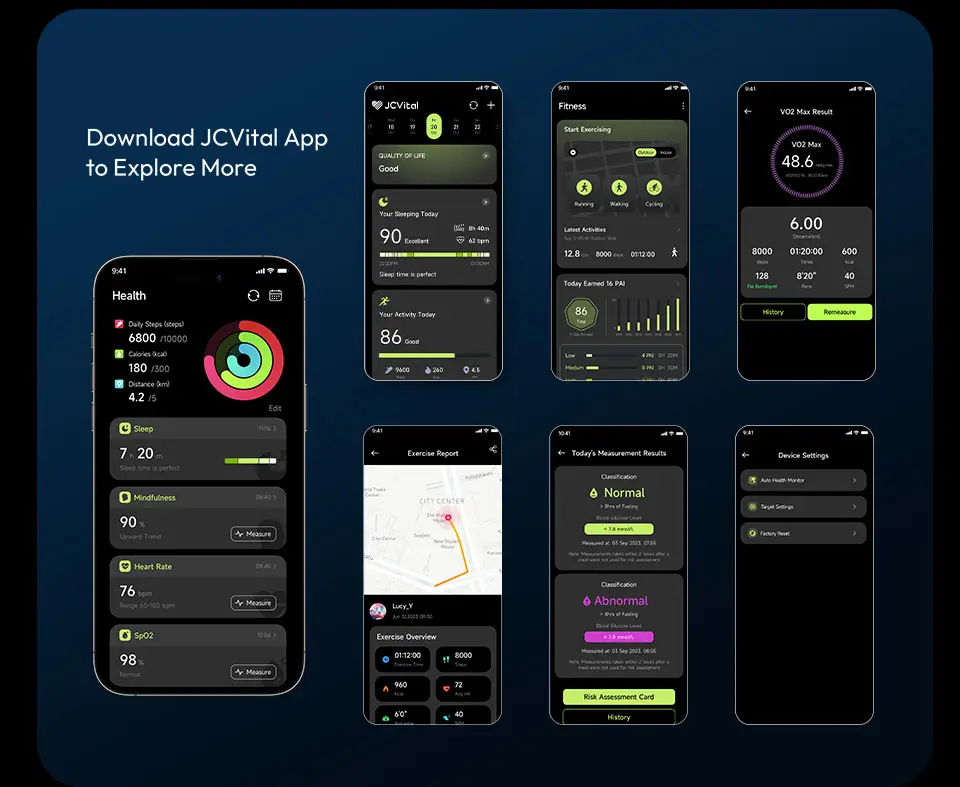
J-STYLE Fitness App: Cross-Platform Excellence
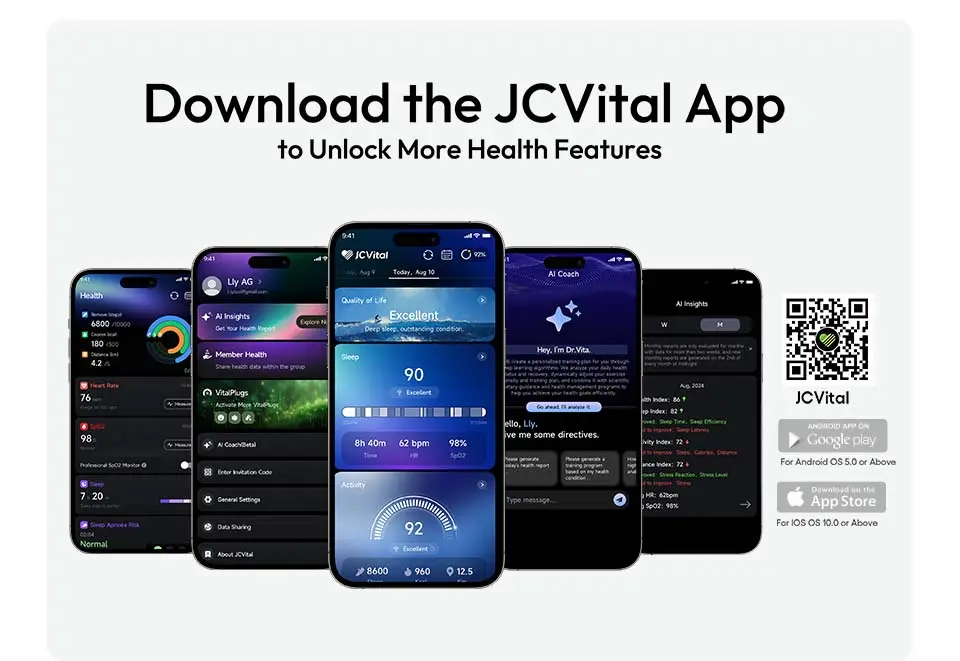
As part of J-STYLE's comprehensive health ecosystem, our companion mobile app delivers seamless integration with J-STYLE wearable devices while maintaining platform-agnostic design principles.
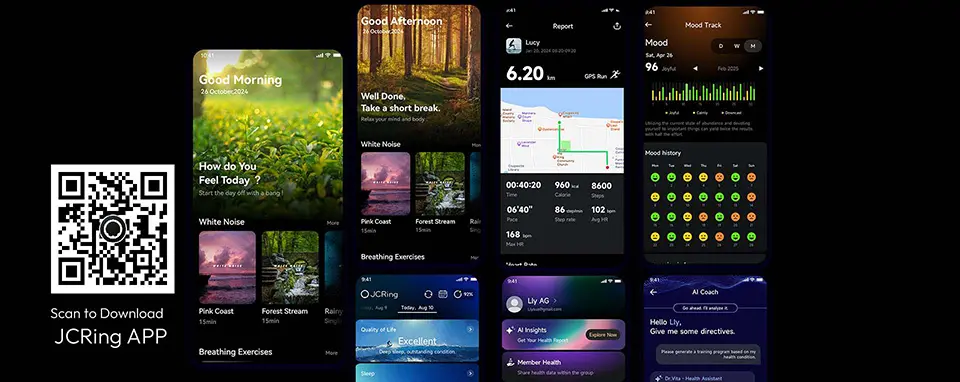
Available On: iOS (App Store) and Android (Google Play)
Core Features:
- Real-time sync with J-STYLE's JCVital Smart Bands and JCRing Smart Rings
- Comprehensive dashboard (activity, sleep, heart rate, workouts)
- 120+ sport mode recognition
- Custom workout creation and logging
- Nutrition tracking integration
- Detailed analytics and trend visualization
Platform Optimization:
- iOS: Full HealthKit integration, Apple Watch companion app, Siri Shortcuts
- Android: Google Fit integration, Wear OS support, customizable widgets
Privacy Commitment: All health data encrypted end-to-end; never sold to third parties; user controls all data sharing.
Download J-STYLE's JCVital App and JCRing App | View App Features
Choosing the Right App for Your Platform
Decision Framework
Step 1: Assess Your Device Ecosystem
If you own iPhone + Apple Watch:
- Best Strategy: Embrace iOS-native apps that leverage Apple Health and Watch integration
- Recommended: Apps with dedicated Apple Watch complications and Shortcuts support
- Avoid: Android-first apps with limited iOS feature parity
If you own Android phone + Wear OS watch:
- Best Strategy: Use Google Fit as central hub; choose apps with Google Fit API integration
- Recommended: Apps optimized for Wear OS with customizable widgets
- Avoid: iOS-exclusive features (won't work on Android)
If you own Android phone + non-Wear OS fitness tracker:
- Best Strategy: Use manufacturer app + cross-platform aggregators
- Recommended: Apps that sync with multiple brands (universal compatibility)
- Avoid: Platform-locked ecosystems
If you switch between iOS and Android:
- Best Strategy: Choose cloud-based cross-platform apps
- Recommended: Apps with web dashboards and universal data export
- Avoid: Apps heavily reliant on platform-specific features
By Fitness Goal
Goal: Weight Loss
- Priority: Nutrition tracking + activity monitoring
- iOS Recommendation: Calorie counter apps with HealthKit integration
- Android Recommendation: Google Fit + nutrition app combination
- Key Feature: Barcode scanner for easy food logging
Goal: Marathon Training
- Priority: GPS accuracy + training plans
- iOS Recommendation: Running apps with Apple Watch coaching
- Android Recommendation: GPS running apps with Wear OS support
- Key Feature: Audio coaching and interval timers
Goal: Strength Training
- Priority: Exercise logging + progress tracking
- iOS/Android: Platform matters less; choose best workout logger
- Key Feature: Custom program builder and rest timers
Goal: General Wellness
- Priority: Simple activity tracking + motivation
- iOS Recommendation: Use Apple Health + lightweight activity app
- Android Recommendation: Google Fit (built-in)
- Key Feature: Daily activity goals and streaks
By Experience Level
Beginners:
- Need: Simple interface, guided workouts, educational content
- iOS: Video workout apps with Apple Fitness+ integration
- Android: YouTube Fitness + Google Fit combination
- Avoid: Complex logging apps with steep learning curves
Intermediate:
- Need: Structured programs, progress tracking, some customization
- Both Platforms: Hybrid apps combining tracking + guidance
- Focus: Apps with 12-week programs and achievement systems
Advanced Athletes:
- Need: Detailed analytics, custom programming, device integration
- Both Platforms: Professional training apps with export capabilities
- Focus: Data granularity and third-party tool integration
Frequently Asked Questions
Q: Do fitness tracker apps work the same on iOS and Android?
A: Core functionality is usually equivalent, but significant differences exist:
Generally Similar:
- Step counting accuracy (both use accelerometer)
- GPS tracking precision (same satellite systems)
- Workout logging features
- Nutrition database quality
- Social/community features
iOS Advantages:
- Better Apple Watch integration (deeper OS-level access)
- Apple Health as universal data hub (aggregates all apps seamlessly)
- SharePlay for group workouts
- Faster app updates (less device fragmentation)
- Stricter privacy controls (HealthKit data never sold)
Android Advantages:
- More aggressive background GPS tracking (longer runs without interruption)
- Wider smartwatch compatibility (Wear OS + third-party brands)
- More customizable widgets
- Google Fit serves as both hub AND standalone app
- Regional pricing (lower costs in some countries)
Feature Parity Varies: Some apps prioritize one platform during development:
- Fitness startups often launch iOS-first (easier to optimize for fewer devices)
- Enterprise/B2B apps sometimes prioritize Android (more corporate device diversity)
- Subscription apps maintain near-identical feature sets (paying users demand parity)
Platform-Specific Features:
- Apple Watch complications (iOS only)
- Wear OS watch faces (Android only)
- Siri Shortcuts (iOS only)
- Google Assistant routines (Android only)
Bottom Line: For casual fitness tracking, platform matters little. For power users with wearables, platform integration becomes critical.
Q: Which platform is better for fitness tracking, iOS or Android?
A: Neither platform is universally "better"—the right choice depends on your specific situation:
Choose iOS If:
✅ You own an Apple Watch (best smartwatch integration) ✅ Privacy is a top priority (HealthKit encryption, on-device processing) ✅ You value app polish (stricter App Store quality standards) ✅ You're willing to pay for premium apps (iOS ecosystem has more paid options) ✅ You want ecosystem simplicity (Apple Health centralizes everything)
Choose Android If:
✅ You want device choice (budget phones to flagships) ✅ You prefer customization (widgets, launchers, automation) ✅ You need longer GPS tracking (less restrictive background processing) ✅ You want third-party smartwatch options (Wear OS, Garmin, Fitbit work better with Android) ✅ You prefer free/ad-supported apps (more common on Android)
Platform-Agnostic Considerations:
Both Platforms Excel At:
- Step counting and basic activity tracking
- GPS route mapping for runs/rides
- Workout logging and exercise databases
- Nutrition and calorie tracking
- Social features and challenges
Neither Platform is Perfect:
- iOS: Expensive hardware, closed ecosystem, limited customization
- Android: Device fragmentation, variable app quality, less privacy-focused
Real-World Recommendation:
For Most Users: Platform doesn't matter—choose based on phone preference, not fitness app capabilities.
For Serious Athletes: iOS + Apple Watch offers best integrated experience (but Android + sport-focused smartwatch like Garmin is excellent too).
For Budget-Conscious: Android offers more affordable hardware options while delivering similar fitness app functionality.
Q: Can I switch fitness apps between iOS and Android without losing data?
A: Usually yes, but with caveats:
Data Migration Methods:
1. Cloud-Based Apps (Easiest): Apps that store data in the cloud allow seamless platform switching:
- Log in on new device with same account
- All workout history, settings, and stats appear instantly
- Examples: Most subscription-based fitness apps
2. Platform Health Hubs:
- From iOS to Android: Export Apple Health data → Import to Google Fit (via third-party migration tools or apps)
- From Android to iOS: Export Google Fit data → Import to Apple Health (some apps facilitate this)
3. Manual Export/Import:
- Export workout data as CSV, TCX, or GPX files
- Import into new platform's app
- Tedious but preserves historical data
4. Third-Party Aggregators: Some fitness platforms act as universal hubs:
- Upload data from any app/device
- Access via web browser or iOS/Android apps
- Platform-agnostic data storage
What Transfers Well: ✅ Workout summaries (date, duration, distance, calories) ✅ GPS routes (stored as GPX files) ✅ Weight and body measurement logs ✅ Nutrition logs (food databases are usually cross-platform) ✅ Personal records and achievements
What May Not Transfer: ❌ Platform-specific features (Apple Watch complications, Wear OS tiles) ❌ App-specific analytics (charts, insights unique to that app) ❌ Social connections (friend lists, challenges) ❌ Premium subscription status (must rebuy on new platform sometimes)
Best Practices for Platform Switching:
- Choose Cloud-Based Apps: Subscription apps with web dashboards are most portable
- Export Regularly: Periodically backup data (many apps offer "Export All Data")
- Use Platform Hubs: Keep Apple Health or Google Fit synced (easier migration later)
- Check Migration Tools: Some apps offer official iOS↔Android migration features
Example Scenario:
Switching from iPhone to Android:
- Open fitness app on iOS
- Go to Settings → Export Data (select all workouts, logs, etc.)
- Install same app on Android
- Go to Settings → Import Data (upload exported file)
- Optional: Export Apple Health data and import to Google Fit
Reality Check: Expect to lose some data granularity. General workout stats transfer fine, but minute-by-minute heart rate graphs or app-specific insights may not survive migration.
A: Free tiers are sufficient for most users, but premium unlocks meaningful value for specific needs:
Free Tiers Are Excellent For:
✅ Basic Activity Tracking
- Step counting, distance, calorie estimation
- Daily/weekly activity summaries
- Goal setting and progress tracking
- Example: Native health apps (Apple Health, Google Fit) are completely free and quite capable
✅ Simple Workout Logging
- Recording exercises, sets, reps, weights
- Viewing workout history
- Basic progress charts
- Limitation: May restrict number of custom workouts or exercises
✅ GPS Running/Cycling
- Route mapping and tracking
- Pace, distance, elevation data
- Workout summaries
- Limitation: Often missing training plans and advanced analytics
✅ Calorie Tracking
- Manual food logging
- Basic macro tracking (protein, carbs, fats)
- Daily calorie goals
- Limitation: Barcode scanning often premium-only
When Premium Is Worth It:
💰 Training for Specific Events
- Marathon, triathlon, or cycling event training plans ($10-15/month)
- Structured weekly workouts with progressive overload
- Audio coaching during runs
- Value: Coaching equivalent to personal trainer at 10% of cost
💰 Detailed Analytics Enthusiasts
- Advanced charts (training load, fatigue indexes, power curves)
- Long-term trend analysis (year-over-year comparisons)
- Performance predictions (estimated race times, VO2 max trends)
- Value: Data insights that inform smarter training decisions
💰 Guided Workout Followers
- Access to full video workout library (100-1,000+ sessions)
- Live streaming classes
- Program progressions (beginner → advanced tracks)
- Value: Replaces gym membership for home exercisers ($10-20/month vs $50+ gym)
💰 Serious Nutrition Trackers
- Barcode scanning (fast food logging)
- Meal planning and recipes
- Micronutrient tracking (vitamins, minerals)
- Value: Saves 5-10 minutes per day vs manual entry (worth it for daily users)
Cost-Benefit Analysis:
Casual User (3 workouts/week, general wellness):
- Recommendation: Stay free
- Reasoning: Basic tracking meets needs; premium features underutilized
- Annual Savings: $120-180
Dedicated Athlete (5-7 workouts/week, specific goals):
- Recommendation: Premium worth it
- Reasoning: Training plans, analytics justify cost; alternative is hiring coach ($100-300/month)
- Annual Value: Save $1,000+ vs. personal coaching
Hybrid Approach: Many users subscribe seasonally:
- Premium during marathon training (3-4 months)
- Free during off-season
- Total annual cost: $30-60 vs. $120-180 year-round
Platform Differences:
iOS Premium Features:
- Often include iCloud sync, Watch complications
- Family sharing (one subscription, 6 family members use app)
- Integration with Apple Fitness+
Android Premium Features:
- Sometimes cheaper than iOS equivalent
- Regional pricing (lower in developing markets)
- More ad-supported alternatives (free tier with ads)
Red Flags (Avoid These Apps):
🚩 Essential features locked behind paywall (step counting requires premium = scam) 🚩 Subscription auto-renews without trial (predatory) 🚩 Premium features not clearly disclosed before download 🚩 No free trial period offered (legitimate apps offer 7-14 days free)
Smart Strategy:
- Start free (test app for 2-4 weeks)
- Identify limitations (what do you actually miss?)
- Trial premium (use free trial to evaluate)
- Decide based on value (is time saved or insights gained worth the cost?)
Bottom Line: Free apps have improved dramatically. Unless you have specific advanced needs, free tiers suffice for 70-80% of users.
Q: Which fitness tracker app uses the least battery on my phone?
A: Battery consumption varies significantly by app type and platform:
Battery Consumption Rankings (Lightest to Heaviest):
1. Passive Activity Trackers (Minimal Drain)
- Battery Impact: 1-3% per day
- Why Efficient: Use built-in motion coprocessor (low-power chip separate from main CPU)
- Examples: Native health apps (Apple Health, Google Fit), simple step counters
- Platform Difference: iOS slightly more efficient (M-series motion coprocessor)
2. Workout Loggers (Low Drain)
- Battery Impact: <1% per session
- Why Efficient: No GPS or continuous sensors; data entry only
- Examples: Gym workout apps, strength training loggers
- Platform Difference: Negligible (both platforms handle database operations efficiently)
3. Indoor Workout Apps (Moderate Drain)
- Battery Impact: 3-8% per hour
- Why Moderate: Video streaming or display-on workouts
- Examples: Follow-along HIIT, yoga, Pilates apps
- Optimization: Download workouts vs. streaming saves battery
4. GPS Running/Cycling Apps (High Drain)
- Battery Impact: 8-15% per hour (screen off), 15-25% per hour (screen on)
- Why Heavy: GPS chip power-hungry; continuous location updates
- Examples: Route tracking running/cycling apps
- Platform Difference:
- iOS: More aggressive background limitations (saves battery but may terminate long sessions)
- Android: Less restrictive (longer tracking possible but drains more)
5. Live Heart Rate Monitoring (Highest Drain)
- Battery Impact: 10-20% per hour
- Why Heaviest: Continuous Bluetooth connection to chest strap/watch
- Combined with GPS: 20-35% per hour
- Recommendation: Use smartwatch for tracking (phone stays in pocket, minimal drain)
Battery Optimization Strategies:
iOS-Specific: ✅ Enable Low Power Mode (reduces GPS accuracy slightly but extends battery) ✅ Use Apple Watch for workouts (phone stays home/in pocket) ✅ Disable "Background App Refresh" for fitness apps not needing real-time sync ✅ Turn off "Always-On Display" during workouts ✅ Download offline maps for GPS apps (reduces cellular data drain)
Android-Specific: ✅ Use Battery Saver mode (may limit background GPS) ✅ Disable "Location: High Accuracy" → Use "Battery Saving" for non-GPS workouts ✅ Restrict background data for fitness apps (manual sync only) ✅ Use Adaptive Battery (AI learns usage patterns, optimizes background activity) ✅ Close GPS apps when workout ends (some continue background tracking)
App Settings to Adjust:
GPS Recording Frequency:
- Every 1 second (accurate but drains fast)
- Every 5 seconds (good compromise)
- Smart recording (only when direction changes; best battery)
Screen Timeout:
- 15 seconds (recommended during GPS workouts)
- Always-on (convenient but drains 2-3x faster)
Auto-Sync:
- Immediate (syncs every change; drains battery)
- Manual (sync when plugged in; saves battery)
- Daily at night (good compromise)
Real-World Battery Test (2-Hour GPS Run):
iPhone 14 Pro:
- GPS app (screen off): 18% battery drain
- GPS app (screen on): 28% battery drain
- Apple Watch tracking + iPhone in pocket: 8% drain (iPhone), 15% drain (Watch)
Samsung Galaxy S23:
- GPS app (screen off): 16% battery drain
- GPS app (screen on): 32% battery drain
- Wear OS watch tracking + phone in pocket: 7% drain (phone), 18% drain (watch)
Conclusion: For long workouts, use smartwatch tracking. For phone-only tracking, GPS is the main culprit—optimize recording frequency and screen usage.
Q: Can I use fitness tracker apps without a smartwatch or fitness band?
A: Absolutely—your smartphone alone is a capable fitness tracker:
What Your Phone Can Track Without Wearables:
✅ Steps & Distance
- Technology: Built-in accelerometer + motion coprocessor
- Accuracy: 93-97% for step counting (nearly as good as wearables)
- Limitation: Must carry phone (doesn't count steps if phone left on desk)
✅ GPS Activities (Running, Cycling, Hiking)
- Technology: GPS, GLONASS, Galileo satellite positioning
- Accuracy: 8-15 meter precision (equal to wearables)
- Advantage: Larger antenna = sometimes better than watch GPS
- Limitation: Must carry phone during workout (awkward for running)
✅ Workout Logging (Strength Training)
- Technology: Manual input or voice logging
- Accuracy: As accurate as you make it (user-entered data)
- Advantage: No wearable needed for gym workouts
✅ Calorie Tracking
- Technology: Food database + manual logging
- Accuracy: Depends on food data quality and portion estimation
- No wearable needed: Camera can estimate portions (AI-powered apps)
✅ Sleep Tracking (Basic)
- Technology: Microphone (detects movement/snoring) or motion sensors (if phone on bed)
- Accuracy: 75-85% (inferior to wearables but usable)
- Limitation: Phone must be on bed/nightstand; less comfortable than wearable
What You CANNOT Track Without Wearables:
❌ Heart Rate (Continuous)
- Smartphone cameras can measure heart rate via finger photoplethysmography
- But requires holding finger on camera—not practical during exercise
- Solution: Chest strap heart rate monitor ($30-80) or smartwatch
❌ Heart Rate Variability (HRV)
- Requires continuous heart rate monitoring
- Solution: Smartwatch or fitness band with optical HR sensor
❌ Blood Oxygen (SpO2)
- Some apps claim to measure via camera, but accuracy is poor
- Solution: Wearable with SpO2 sensor or medical pulse oximeter
❌ All-Day Activity Tracking
- Phone can't track activity when not carried (e.g., doing dishes, walking around house)
- Wearables capture all movement
- Gap: Phone-only tracking underestimates daily activity by 20-40%
Smartphone-Only Fitness Tracking Strategies:
For Runners:
- Use phone's GPS for route tracking
- Armband or running belt to carry phone comfortably
- Audio coaching through headphones
- Trade-off: Less convenient than watch, but fully functional
For Gym-Goers:
- Phone on bench or in pocket during sets
- Manual logging between exercises
- Rest timer notifications
- Advantage: Large screen for viewing exercise videos/form cues
For Walkers:
- Phone in pocket counts steps automatically
- Background tracking (no need to open app)
- Works throughout day
- Limitation: Forgets phone at home = no data
For General Wellness:
- Phone tracks steps during daily activities
- Manual weight logging
- Nutrition tracking via phone camera (food recognition)
- Gap: Missing overnight data (sleep, resting heart rate)
When to Upgrade to Wearable:
Consider Wearable If:
- You want continuous heart rate monitoring
- Sleep tracking is important to you
- You run/cycle and hate carrying phone
- You want all-day activity data (phone left on desk frequently)
- You need real-time workout stats (glanceable during exercise)
Stick with Phone-Only If:
- Budget is tight ($0 vs. $100-500 for wearable)
- You already carry phone everywhere
- You only track occasional workouts (not 24/7 monitoring)
- You're testing fitness tracking before investing in hardware
Bottom Line: Smartphones are highly capable fitness trackers—wearables add convenience and continuous monitoring, but aren't required for effective fitness tracking.
Q: Are fitness tracker apps accurate for calorie counting?
A: Accuracy varies significantly by measurement method:
Calorie Burn Estimation Accuracy (vs. Laboratory Metabolic Testing):
Resting Metabolic Rate (BMR):
- App Calculation: 90-95% accurate
- Method: Based on age, sex, height, weight (standardized formulas)
- Why Accurate: BMR is predictable from body metrics
Activity Calories (No Heart Rate):
- Accuracy: 65-80%
- Method: Accelerometer-detected movement + MET values
- Limitations: Cannot distinguish effort level (walking fast vs. slow = similar movement)
Activity Calories (With Heart Rate):
- Accuracy: 80-92%
- Method: Heart rate + movement + personal data
- Why Better: Heart rate reflects actual effort
GPS-Based Cardio (Running, Cycling):
- Accuracy: 85-93%
- Method: Distance + pace + terrain + heart rate + weight
- Why Most Accurate: Multiple data points reduce error
Strength Training:
- Accuracy: 60-75%
- Method: Estimated from workout duration + average heart rate
- Why Least Accurate: Calorie burn happens during rest periods (not captured well)
Factors Affecting Accuracy:
Accurate Personal Data: ✅ Correct weight (single biggest factor—10 lb error = 10-15% calorie error) ✅ Accurate age (metabolism slows with age) ✅ Honest sex (men burn more calories due to higher muscle mass) ✅ Updated height (affects stride length, BMR)
Inaccurate Personal Data: ❌ Outdated weight (haven't updated in 6 months) ❌ Generic estimates (guessing height/weight) ❌ Wrong sex selected ❌ Incorrect age
Activity-Specific Challenges:
Overestimates:
- Strength training (apps assume continuous work; reality has rest periods)
- Low-intensity walking (apps may use jogging METs)
- Sports with breaks (basketball, tennis)
Underestimates:
- High-intensity intervals (anaerobic metabolism undercounted)
- Incline walking/running (apps may not account for elevation)
- Swimming (heart rate often reads low in water)
How Apps Calculate Calories:
Basic Formula:
Calories = BMR × Activity Multiplier × DurationEnhanced Formula (With Heart Rate):
Calories = (Heart Rate - Resting HR) / (Max HR - Resting HR) × Max Calorie Burn Rate × DurationAdvanced Formula (GPS Cardio):
Calories = Body Weight × Distance × Terrain Factor × Efficiency FactorPlatform Differences:
iOS (via Apple Health):
- Uses HealthKit's energy expenditure algorithms
- Combines Watch heart rate + iPhone GPS
- Generally 85-90% accurate for cardio
Android (via Google Fit):
- Uses Google Fit's "Heart Points" and "Move Minutes"
- Combines device sensors + user input
- Generally 80-88% accurate
Improving Accuracy:
1. Keep Personal Data Updated
- Update weight weekly (or after 5+ lb change)
- Update fitness level (VO2 max estimates improve over time)
2. Use Heart Rate Monitoring
- Chest strap: 92-97% calorie accuracy (most accurate)
- Wrist-based watch: 85-92% accuracy (very good)
- Phone-only: 65-80% accuracy (acceptable)
3. Log Realistically
- Don't count warm-up/cooldown as "exercise intensity"
- Reduce strength training duration by 30% (account for rest)
- Use sport-specific modes (running vs. general cardio)
4. Cross-Reference
- Compare app estimates to online calculators
- If app shows 800 cal for 30-min walk (suspicious), verify against standards
Reality Check:
Normal Ranges:
- Walking (3 mph): 200-300 cal/hour
- Running (6 mph): 600-900 cal/hour
- Cycling (12-14 mph): 400-700 cal/hour
- Swimming: 400-600 cal/hour
- Strength training: 200-400 cal/hour
Red Flags: 🚩 App shows 1,000 calories for 30-minute workout (unless extremely intense) 🚩 Calorie burn varies wildly day-to-day for same workout 🚩 App doesn't ask for weight/age/sex (no way to personalize)
Bottom Line: Use calorie estimates as directional guides, not gospel. Focus on week-to-week trends (burned 500 fewer calories this week = meaningful) rather than daily absolute numbers. Combine with actual weight change over time for best results.
Conclusion: Finding Your Perfect Fitness App
The fitness app landscape in 2026 offers remarkable choice regardless of your smartphone platform. While iOS and Android each have distinctive advantages—iOS excels at ecosystem integration and privacy, Android offers flexibility and device choice—the core fitness tracking experience is largely equivalent across platforms.
Key Takeaways:
Platform Matters Less Than You Think: For basic activity tracking, workout logging, and nutrition monitoring, both iOS and Android apps deliver similar functionality and accuracy. Your choice of smartphone should be driven by broader preferences (budget, ecosystem, camera quality) rather than fitness app considerations alone.
Platform Matters More for Power Users: If you own a smartwatch (Apple Watch or Wear OS), demand advanced analytics, or prioritize ecosystem integration, platform differences become significant. Apple Watch + iPhone offers the most polished experience, while Android + third-party wearables provides maximum flexibility.
App Quality Varies More Than Platform: A poorly designed app is bad on both platforms. A well-crafted app shines on both. Focus on finding the right app for your fitness goals (running, strength, yoga, etc.) rather than limiting choices by platform.
Free Tiers Are Powerful: The days of needing paid apps for basic fitness tracking are over. Both iOS and Android offer excellent free options that satisfy 70-80% of users. Premium subscriptions add value for specific needs (training plans, video libraries, advanced analytics) but aren't essential for everyone.
Your Fitness Journey, Your Choice: Whether you track 5,000 steps daily on a budget Android phone or train for marathons with an iPhone and Apple Watch, the best fitness app is the one you'll actually use consistently. Features, interface, and community matter more than the underlying platform.
Choose apps that align with your goals, respect your privacy, and make fitness tracking feel effortless rather than burdensome. Your health data deserves both protection and purpose—select wisely, track consistently, and let technology amplify your fitness journey.
Additional Resources
Official Documentation:
- Apple HealthKit Developer Guide: developer.apple.com/healthkit
- Google Fit API Documentation: developers.google.com/fit
- iOS Human Interface Guidelines: developer.apple.com/design
- Android Material Design: material.io
Privacy & Security:
- Apple Privacy Policy (Health Data): apple.com/privacy/health
- Google Fit Data Practices: support.google.com/fit/privacy
- FTC Guidance on Health App Privacy: ftc.gov
Fitness Tracking Research:
- Journal of Medical Internet Research (wearable accuracy studies)
- American College of Sports Medicine (exercise guidelines)
- National Institutes of Health (physical activity recommendations)
Disclaimer: This guide provides general information about fitness tracking apps and platforms. App features, availability, and pricing are subject to change. Always verify current information on official app stores. This article is not sponsored by Apple, Google, or any fitness app developer. Recommendations are based on publicly available information and general industry analysis.
Last Updated: January , 2026
Related Articles:
- Smart Band Price Guide: How Much Does a Smart Band Cost in 2026?
- What Is a Smart Band | Smart Bracelet? A Complete Beginner’s Guide
- How Fitness Trackers Work: PPG, Accelerometer & Sensors Explained
About the Author

Kyler is a senior content marketing specialist at J-Style(Jointcorp|Joint Chinese Ltd | Youhong Medical), a leading smart ring, smart band, and smart watch manufacturer and supplier in China. With 8 years of experience in the wearable tech industry, he creates professional content for global B2B buyers seeking reliable factory, wholesale, OEM/ODM, and SDK/API solutions. At J-Style, Kyler focuses on helping partners understand the value of high-quality Chinese smart wearables and how J-Style’s innovative manufacturing capabilities support scalable business growth.