

Updated 2 months ago
Can a Smart Band Work Without the Manufacturer's App?
youhong
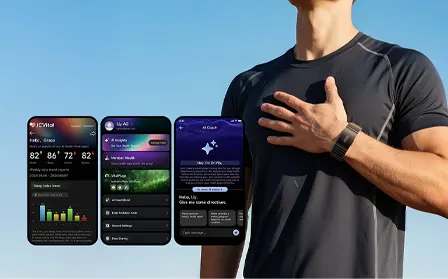
A common question from companies developing fitness apps, wellness platforms, digital health solutions, and connected-device ecosystems is:
Can a smart band work without the manufacturer's app?
The short answer is: sometimes, yes — but it depends on how the smart band exposes its data and connectivity interfaces.
A smart band may be technically capable of communicating directly with a customer's own iOS or Android application through Bluetooth Low Energy (BLE). However, direct integration depends on factors such as the device firmware, BLE/GATT protocol, SDK, API, available data, authentication method, and the manufacturer's integration documentation.
For B2B projects, the more useful question is therefore not simply:
"Can I use a smart band without its app?"
Instead, ask:
"Can this smart band provide the data and integration interfaces required by my own application?"
This distinction is particularly important for companies developing their own branded wearable ecosystem.
Can a Smart Band Work Without a Manufacturer's App?
Yes, a smart band can potentially work with a customer's own application without requiring the manufacturer's consumer app, provided that the wearable supports the required integration method.
A simplified architecture looks like this:
Smart Band
    ↓
Bluetooth Low Energy
    ↓
BLE / GATT
    ↓
Your iOS / Android App
    ↓
Your Data Layer
    ↓
Your Cloud Platform
There are several possible integration models:
- Direct BLE/GATT integration
- Manufacturer SDK
- Manufacturer API
- SDK + API
- A customized communication protocol
The exact approach depends on the wearable model and project requirements.
Bluetooth SIG describes GATT as the framework used to organize BLE data through services, characteristics, and descriptors.
Apple's Core Bluetooth framework provides the iOS APIs required for applications to communicate with Bluetooth Low Energy devices, including discovering, connecting to, and interacting with peripherals.
This means that a smart band does not inherently need to be limited to a single mobile application. The determining factor is the technical interface exposed by the device.
Why Would a Company Want to Use a Smart Band Without the Manufacturer's App?
For consumers, a manufacturer's app may provide the easiest way to view wearable data.
For B2B customers, however, the business requirement can be different.
A company may already have its own:
- iOS application
- Android application
- Fitness platform
- Wellness application
- Digital health platform
- Corporate wellness system
- Cloud backend
- Analytics dashboard
- Customer account system
In this situation, the smart band can become a data acquisition device within the company's existing ecosystem.
The architecture may look like:
                 YOUR PLATFORM

        ┌─────────────────────────┐
        │     iOS / Android App   │
        └────────────┬────────────┘
                     │
                  BLE / SDK
                     │
        ┌────────────▼────────────┐
        │       Smart Band        │
        └────────────┬────────────┘
                     │
                  Sensors
                     │
        ┌────────────▼────────────┐
        │     Wearable Data       │
        └─────────────────────────┘
The company's own application can then control the user experience, data presentation, account system, analytics, and cloud integration.
What Does "Without the Manufacturer's App" Actually Mean?
This phrase can describe several different scenarios.
Using the Smart Band With Your Own App
The most common B2B scenario is:
Smart Band
    ↓
BLE
    ↓
Your App
The wearable communicates directly with the customer's application.
Using the Smart Band With Your Own Cloud Platform
Another architecture is:
Smart Band
    ↓
BLE
    ↓
Your Mobile App
    ↓
Your Backend
    ↓
Your Cloud Platform
The mobile application acts as the communication gateway between the wearable and cloud.
Using a Smart Band as Part of an OEM Product
For OEM projects, the architecture can become:
Customized Smart Band
        ↓
Customer's Mobile App
        ↓
Customer's Cloud
        ↓
Customer's Brand
The wearable becomes part of a larger branded technology ecosystem.
Using Direct BLE Access for Development
For developer-focused projects, direct BLE access may be used to discover services, characteristics, notifications, and supported data.
The exact availability depends on the wearable's firmware and technical documentation.
How Does a Smart Band Communicate With Your Own App?
Most modern wearable integration projects use Bluetooth Low Energy.
A simplified communication path is:
Sensor
  ↓
Firmware
  ↓
BLE
  ↓
GATT
  ↓
Mobile App
GATT organizes BLE information through services, characteristics, and descriptors. Bluetooth SIG's documentation explains that characteristics contain values and properties defining how those values can be accessed.
For example, a wearable could expose a service containing characteristics related to:
Health Service
│
├── Heart Rate Characteristic
├── Activity Characteristic
├── Battery Characteristic
└── Device Status Characteristic
The actual services and characteristics vary by device.
Developers should therefore obtain the technical documentation for the exact smart band being evaluated.
What Is Needed to Connect a Smart Band to Your Own App?
A B2B integration project normally requires several technical components.
Smart Band Hardware
The hardware needs to support the required sensors and wireless communication.
Potential data requirements may include:
- Heart rate
- HRV
- Steps
- Calories
- Activity
- Workout duration
- Sleep-related data
- SpO₂
- Other supported physiological or wellness metrics
Not every device supports every metric.
Firmware
The firmware determines how the device processes and exposes its data.
Firmware can also influence:
- Sampling behavior
- Data storage
- Synchronization
- BLE communication
- Device commands
- Battery behavior
BLE Interface
The device should expose the necessary Bluetooth communication interface.
GATT Structure
Developers may need:
- Service UUIDs
- Characteristic UUIDs
- Read characteristics
- Write characteristics
- Notification characteristics
- Data formats
- Packet structures
SDK or API
Depending on the project, an SDK or API may simplify integration.
Documentation
Documentation is critical.
A useful technical package may include:
- Integration guide
- Data dictionary
- BLE protocol documentation
- SDK documentation
- API documentation
- Sample code
- Firmware compatibility information
Can You Connect a Smart Band Directly to an iPhone?
Yes, when the smart band exposes a compatible BLE interface and the application has the required permissions and integration logic.
Apple's Core Bluetooth framework provides the APIs required to scan for, discover, connect to, and communicate with BLE peripherals.
A typical flow is:
iPhone
  ↓
Core Bluetooth
  ↓
Scan
  ↓
Discover Smart Band
  ↓
Connect
  ↓
Discover Services
  ↓
Discover Characteristics
  ↓
Read / Write / Notify
  ↓
Decode Data
  ↓
Your App
Apple identifies a BLE peripheral as a device containing services and characteristics that an application can discover and interact with.
iOS Development Considerations
Developers should evaluate:
- Bluetooth permissions
- Device discovery
- Connection management
- Service discovery
- Characteristic discovery
- Notifications
- Reconnection
- Background behavior
- Data synchronization
- Battery impact
Apple also notes that Core Bluetooth requires appropriate usage descriptions in the application's Info.plist.
For applications intended to operate across newer iOS versions, developers should validate current background BLE behavior against Apple's latest documentation.
Can You Connect a Smart Band Directly to Android?
Yes, provided that the wearable exposes a compatible BLE interface.
Android provides Bluetooth APIs for working with Bluetooth devices and BLE/GATT connections. Android's current Bluetooth API documentation includes support for Bluetooth Low Energy transport and related device operations.
A typical Android architecture is:
Android App
    ↓
Bluetooth Adapter
    ↓
BLE Scan
    ↓
Smart Band
    ↓
GATT Connection
    ↓
Services
    ↓
Characteristics
    ↓
Notifications / Reads / Writes
    ↓
Data Processing
Developers should evaluate:
- Android version compatibility
- Bluetooth permissions
- BLE scanning
- GATT connection
- Service discovery
- Characteristic operations
- Notifications
- Reconnection
- Background behavior
- Battery optimization
Does a Smart Band Need an SDK?
Not necessarily.
There are several possible integration approaches.
Direct BLE/GATT Integration
Your App
   ↓
BLE
   ↓
GATT
   ↓
Smart Band
This approach requires sufficient protocol documentation.
SDK Integration
Your App
   ↓
Manufacturer SDK
   ↓
Smart Band
An SDK can provide higher-level functions that reduce the amount of low-level BLE implementation required by the application.
API-Based Integration
Wearable
   ↓
Data Platform
   ↓
API
   ↓
Your Application
The exact architecture depends on how data is made available by the wearable platform.
SDK + API
Some projects can involve both:
Smart Band
   ↓
BLE / SDK
   ↓
Mobile App
   ↓
API
   ↓
Cloud Platform
Can a Smart Band Work Only With Its Manufacturer's App?
It depends on the product's technical architecture.
A smart band may be designed around a specific application ecosystem, or it may provide interfaces intended for third-party application integration.
For B2B customers, this is why product evaluation should happen before development begins.
The key questions are:
- Does the device support direct BLE?
- Is GATT documentation available?
- Is an SDK available?
- Is an API available?
- Which data fields can be accessed?
- Can historical data be synchronized?
- Can real-time data be accessed?
- Are iOS and Android supported?
- Can the firmware support the intended workflow?
The answer should be confirmed for the specific product configuration rather than assumed from the product category.
Can You Get Heart Rate Data Without the Manufacturer's App?
Potentially, yes.
If the smart band exposes heart-rate data through a supported BLE characteristic, SDK, or other integration interface, a customer's own application may be able to access the data.
A simplified architecture is:
Heart Rate Sensor
       ↓
Firmware
       ↓
BLE
       ↓
Heart Rate Data
       ↓
Your Application
Bluetooth SIG has standardized health-related Bluetooth profiles and services, including the Generic Health Sensor Profile, which provides a framework for communicating health-related observations from personal health devices.
However, not every commercial wearable uses the same standardized service.
A manufacturer may expose proprietary services or application-specific characteristics.
Therefore, the actual device documentation remains the authoritative source for integration.
Can You Get Sleep Data Without the Manufacturer's App?
This depends on how sleep data is stored and exposed.
A typical architecture could be:
Smart Band
     ↓
Sleep Tracking
     ↓
Internal Memory
     ↓
BLE Synchronization
     ↓
Your App
     ↓
Sleep Database
Historical synchronization can be especially important for sleep because sleep records are often generated over an extended period rather than as a single real-time value.
Before development, ask:
- Is sleep data stored on the device?
- How long is historical data retained?
- Can historical records be synchronized through BLE?
- Are timestamps included?
- How are sleep sessions structured?
- Are sleep stages available?
- What happens when synchronization is interrupted?
These questions are more important for B2B application integration than simply asking whether the wearable "tracks sleep."
Can a Smart Band Send Data Directly to Your Cloud?
Usually, a smart band does not need to communicate directly with a cloud server.
A common architecture is:
Smart Band
     ↓
BLE
     ↓
Mobile App
     ↓
HTTPS / API
     ↓
Cloud Server
The smartphone acts as the gateway.
This architecture allows the application to:
- Receive wearable data
- Validate data
- Normalize data
- Store local records
- Synchronize data
- Upload selected records
- Manage user accounts
For many B2B applications, this is a practical architecture because the mobile device already provides internet connectivity.
How Should Wearable Data Be Structured in Your App?
Raw BLE packets should generally not become the application's final business data model.
Instead:
BLE Packet
    ↓
Protocol Decoder
    ↓
Validation
    ↓
Normalization
    ↓
Application Data Model
    ↓
Database
For example:
{
  "metric": "heart_rate",
  "value": 76,
  "unit": "bpm",
  "timestamp": "2026-09-07T10:30:00Z",
  "source": "smart_band"
}
The actual packet structure and units depend on the device.
A normalized internal model can make it easier to:
- Change firmware
- Support multiple devices
- Add new wearable models
- Maintain historical records
- Build analytics
- Integrate with cloud services
What Data Can a Smart Band Provide to Your App?
Depending on the product and configuration, a smart band may provide:
Activity Data
- Steps
- Distance
- Calories
- Activity duration
- Workout duration
- Activity categories
Physiological Data
- Heart rate
- HRV
- SpO₂
- Other supported physiological metrics
Sleep Data
- Sleep duration
- Sleep periods
- Sleep-related metrics
- Other supported sleep information
Device Data
- Battery
- Firmware version
- Device status
- Connection status
The available data should always be confirmed against the specific product and firmware.
What About Blood Glucose Risk Assessment?
If a wearable or software platform provides a blood glucose risk assessment, this should be described accurately.
A blood glucose risk assessment is an assessment of potential risk, not a direct measurement of a specific blood glucose value.
It should not be presented as a direct blood glucose measurement and cannot replace medical testing, professional medical evaluation, or medical diagnosis.
For B2B applications, this distinction should remain consistent across:
- Product pages
- Application interfaces
- Technical documentation
- Marketing materials
- User instructions
Can J-Style Smart Bands Be Evaluated for Own-App Integration?
J-Style provides B2B wearable solutions for companies developing their own applications, digital platforms, connected-device ecosystems, and branded wearable products.
The J-Style Smart Band Collection includes wearable products that can be evaluated according to application requirements, sensor configuration, connectivity, software integration, and OEM/ODM needs.
For an own-app project, the technical evaluation should focus on the exact product configuration and required data interface.
JCVital V8 Smart Band for B2B Evaluation
The JCVital V8 ECG Smart Band can be considered for B2B projects requiring a smart-band form factor and health-oriented wearable functionality.
For an own-app integration project, developers should evaluate:
- Required health and fitness data
- BLE connectivity
- SDK availability
- API requirements
- iOS compatibility
- Android compatibility
- Historical synchronization
- Firmware requirements
- OEM/private-label requirements
JCVital smart bands use an IP68 water-resistance rating for applicable models. The exact specification should be confirmed for the selected product configuration.
JCRing Smart Ring Solutions
For projects where a ring form factor is more appropriate, J-Style also provides a Smart Ring Collection.
The JCRing Med X3 Blood Oxygen Ring can be evaluated for B2B projects requiring a compact wearable form factor.
Applicable JCRing smart ring products use a 5ATM water-resistance rating.
As with any wearable integration project, developers should confirm the exact hardware, firmware, data fields, BLE interface, and SDK/API availability for the specific project configuration.
What Should You Ask a Wearable Manufacturer Before Integration?
Before building your own app integration, request a technical checklist.
Connectivity
Ask:
- Does the device support BLE?
- What BLE version is supported?
- Is direct BLE access available?
- Is GATT documentation available?
GATT
Request:
- Service UUIDs
- Characteristic UUIDs
- Read characteristics
- Write characteristics
- Notification characteristics
- Data packet definitions
- Encoding rules
Data
Confirm:
- Heart rate
- HRV
- Steps
- Calories
- Sleep
- SpO₂
- Activity
- Workout
- Historical records
SDK
Ask whether an SDK is available for:
- iOS
- Android
Also request:
- SDK documentation
- Sample code
- Version information
- Integration instructions
API
If a cloud API is available, request:
- Authentication method
- API documentation
- Data endpoints
- Data formats
- Rate limits
- Error handling
- Data synchronization behavior
Firmware
Confirm:
- Supported firmware versions
- Firmware update mechanism
- Backward compatibility
- Data protocol compatibility
What Is the Best Development Process?
A practical B2B wearable integration workflow is:
Business Requirements
        ↓
Data Requirements
        ↓
Select Candidate Wearable
        ↓
Request Technical Documentation
        ↓
Order Samples
        ↓
BLE / SDK Testing
        ↓
iOS Testing
        ↓
Android Testing
        ↓
Data Validation
        ↓
Pilot Integration
        ↓
OEM / ODM Development
        ↓
Production
This process allows technical issues to be identified before large-scale production.
Why Sample Testing Matters
A product page can tell you what a wearable is designed to support.
However, an app developer needs to understand how the device behaves in a real software environment.
Sample testing can answer questions such as:
- Can the device be discovered?
- Can it connect reliably?
- Are required services available?
- Can required characteristics be accessed?
- Are notifications stable?
- Can historical data be synchronized?
- How does reconnection work?
- Does the data format match the documentation?
- Does the same workflow work on iOS and Android?
For B2B projects, these questions should ideally be answered before finalizing the software architecture.
Common Mistakes When Building an Own-App Wearable Integration
Assuming Bluetooth Means Open Data Access
A wearable can support Bluetooth without necessarily exposing all device data through an interface intended for third-party applications.
Always confirm the available data-access method.
Choosing a Device Before Defining Data Requirements
Start with:
What data does the application need?
Then select the wearable.
Not the other way around.
Treating Sensor Availability as Data Availability
A sensor may exist inside a wearable while the application interface exposes a different set of data.
Therefore:
Sensor ≠ Automatically Accessible Data
Ignoring Historical Synchronization
Real-time data and historical data are different technical requirements.
A workout application may need live heart rate, while a sleep application may need several hours of historical records.
Ignoring Firmware Compatibility
The same hardware can behave differently across firmware versions.
Document firmware compatibility from the beginning.
Testing Only One Mobile Platform
A project targeting both iOS and Android should test both environments early.
Smart Band Without Manufacturer App: Technical Checklist
Before selecting a wearable for your own application, review the following checklist.
Device
- Required sensors confirmed
- Required data confirmed
- Battery requirements reviewed
- Water-resistance specification confirmed
- Firmware requirements confirmed
BLE
- BLE supported
- Direct BLE access confirmed
- GATT documentation available
- Service UUIDs available
- Characteristic UUIDs available
- Notification behavior documented
Data
- Real-time data available
- Historical data available
- Timestamps available
- Data units documented
- Data synchronization tested
App
- iOS supported
- Android supported
- SDK available if required
- API available if required
- Sample code available
Business
- OEM requirements defined
- ODM requirements defined
- Branding requirements defined
- Firmware customization evaluated
- Production requirements defined
Frequently Asked Questions
Can a smart band work without the manufacturer's app?
Yes, in some configurations. If the wearable provides a supported BLE/GATT interface, SDK, API, or another integration method, a customer's own mobile application may be able to communicate with the device directly.
Can I connect a smart band directly to my own app?
Yes, when the device provides a suitable integration interface. Direct BLE/GATT integration is one possible approach.
Can I connect a smart band to both iOS and Android?
Yes, when the wearable's integration interface supports both platforms. Apple provides Core Bluetooth for BLE communication on iOS, while Android provides Bluetooth APIs for BLE and GATT-based communication.
Do I need the manufacturer's consumer app?
Not necessarily for a B2B integration project. Whether the manufacturer's app is required depends on the specific wearable's architecture and available integration interfaces.
Can I get heart-rate data directly into my own app?
Potentially, if the wearable exposes heart-rate data through BLE/GATT, an SDK, or another supported interface. The exact data-access method should be confirmed for the selected device.
Can I get sleep data without using the manufacturer's app?
Potentially. If historical sleep records are exposed through the supported integration interface, they can potentially be synchronized to the customer's own application.
Can I access wearable data through BLE?
Yes, when the wearable provides the appropriate BLE/GATT interface. Bluetooth SIG defines GATT as a framework for organizing BLE services and characteristics.
Is an SDK required for own-app integration?
No. Some projects can use direct BLE/GATT integration. Others may use an SDK or API depending on the device and software architecture.
Can wearable data be sent to my own cloud platform?
Yes. A common architecture is:
Smart Band → BLE → Mobile App → Cloud API → Customer Platform
What should developers request before buying samples?
Developers should request the supported data list, BLE/GATT documentation, SDK/API documentation, sample code, firmware requirements, iOS/Android support information, and historical synchronization details.
Can J-Style support own-app wearable projects?
J-Style supports B2B smart wearable projects involving smart bands, smart rings, software integration evaluation, OEM/private-label development, and ODM requirements. Project-specific SDK, BLE, API, firmware, and data capabilities should be confirmed during technical evaluation.
Conclusion
A smart band can potentially work without the manufacturer's app, but the key requirement is not simply Bluetooth connectivity.
The wearable needs an appropriate interface that allows the customer's application to communicate with the device and access the required data.
The main integration options are:
Direct BLE / GATT
        OR
SDK
        OR
API
        OR
SDK + API
For B2B developers, the most important evaluation criteria are:
- Required wearable data
- BLE/GATT access
- SDK availability
- API availability
- iOS compatibility
- Android compatibility
- Real-time data
- Historical data
- Firmware compatibility
- Data documentation
- OEM/ODM requirements
The ideal development process is:
Define Data → Select Wearable → Test Samples → Validate BLE/SDK → Build iOS/Android Integration → Validate Data → Scale to OEM/ODM Production
For companies developing their own wearable ecosystem, explore the J-Style Smart Band Collection or evaluate the JCVital V8 Smart Band.
For alternative wearable form factors, see the J-Style Smart Ring Collection and JCRing Med X3.
For additional developer resources, continue with:
How to Integrate Wearable Health Data into Your Own Mobile App
Smart Band SDK vs API: What Do Developers Need for Wearable App Integration?
How to Access Smart Band Data Through BLE: A Practical Guide for iOS and Android
BLE GATT Protocol for Wearable Health Data: A Developer's Primer
What Health Data Can Smart Bands Collect? A Guide for App Developers
Can a Smart Band Work Without the Manufacturer's App?
Last Updated: September 2026
A common question from companies developing fitness apps, wellness platforms, digital health solutions, and connected-device ecosystems is:
Can a smart band work without the manufacturer's app?
The short answer is: sometimes, yes — but it depends on how the smart band exposes its data and connectivity interfaces.
A smart band may be technically capable of communicating directly with a customer's own iOS or Android application through Bluetooth Low Energy (BLE). However, direct integration depends on factors such as the device firmware, BLE/GATT protocol, SDK, API, available data, authentication method, and the manufacturer's integration documentation.
For B2B projects, the more useful question is therefore not simply:
"Can I use a smart band without its app?"
Instead, ask:
"Can this smart band provide the data and integration interfaces required by my own application?"
This distinction is particularly important for companies developing their own branded wearable ecosystem.
Can a Smart Band Work Without a Manufacturer's App?
Yes, a smart band can potentially work with a customer's own application without requiring the manufacturer's consumer app, provided that the wearable supports the required integration method.
A simplified architecture looks like this:
Smart Band
    ↓
Bluetooth Low Energy
    ↓
BLE / GATT
    ↓
Your iOS / Android App
    ↓
Your Data Layer
    ↓
Your Cloud Platform
There are several possible integration models:
- Direct BLE/GATT integration
- Manufacturer SDK
- Manufacturer API
- SDK + API
- A customized communication protocol
The exact approach depends on the wearable model and project requirements.
Bluetooth SIG describes GATT as the framework used to organize BLE data through services, characteristics, and descriptors.
Apple's Core Bluetooth framework provides the iOS APIs required for applications to communicate with Bluetooth Low Energy devices, including discovering, connecting to, and interacting with peripherals.
This means that a smart band does not inherently need to be limited to a single mobile application. The determining factor is the technical interface exposed by the device.
Why Would a Company Want to Use a Smart Band Without the Manufacturer's App?
For consumers, a manufacturer's app may provide the easiest way to view wearable data.
For B2B customers, however, the business requirement can be different.
A company may already have its own:
- iOS application
- Android application
- Fitness platform
- Wellness application
- Digital health platform
- Corporate wellness system
- Cloud backend
- Analytics dashboard
- Customer account system
In this situation, the smart band can become a data acquisition device within the company's existing ecosystem.
The architecture may look like:
                 YOUR PLATFORM

        ┌─────────────────────────┐
        │     iOS / Android App   │
        └────────────┬────────────┘
                     │
                  BLE / SDK
                     │
        ┌────────────▼────────────┐
        │       Smart Band        │
        └────────────┬────────────┘
                     │
                  Sensors
                     │
        ┌────────────▼────────────┐
        │     Wearable Data       │
        └─────────────────────────┘
The company's own application can then control the user experience, data presentation, account system, analytics, and cloud integration.
What Does "Without the Manufacturer's App" Actually Mean?
This phrase can describe several different scenarios.
Using the Smart Band With Your Own App
The most common B2B scenario is:
Smart Band
    ↓
BLE
    ↓
Your App
The wearable communicates directly with the customer's application.
Using the Smart Band With Your Own Cloud Platform
Another architecture is:
Smart Band
    ↓
BLE
    ↓
Your Mobile App
    ↓
Your Backend
    ↓
Your Cloud Platform
The mobile application acts as the communication gateway between the wearable and cloud.
Using a Smart Band as Part of an OEM Product
For OEM projects, the architecture can become:
Customized Smart Band
        ↓
Customer's Mobile App
        ↓
Customer's Cloud
        ↓
Customer's Brand
The wearable becomes part of a larger branded technology ecosystem.
Using Direct BLE Access for Development
For developer-focused projects, direct BLE access may be used to discover services, characteristics, notifications, and supported data.
The exact availability depends on the wearable's firmware and technical documentation.
How Does a Smart Band Communicate With Your Own App?
Most modern wearable integration projects use Bluetooth Low Energy.
A simplified communication path is:
Sensor
  ↓
Firmware
  ↓
BLE
  ↓
GATT
  ↓
Mobile App
GATT organizes BLE information through services, characteristics, and descriptors. Bluetooth SIG's documentation explains that characteristics contain values and properties defining how those values can be accessed.
For example, a wearable could expose a service containing characteristics related to:
Health Service
│
├── Heart Rate Characteristic
├── Activity Characteristic
├── Battery Characteristic
└── Device Status Characteristic
The actual services and characteristics vary by device.
Developers should therefore obtain the technical documentation for the exact smart band being evaluated.
What Is Needed to Connect a Smart Band to Your Own App?
A B2B integration project normally requires several technical components.
Smart Band Hardware
The hardware needs to support the required sensors and wireless communication.
Potential data requirements may include:
- Heart rate
- HRV
- Steps
- Calories
- Activity
- Workout duration
- Sleep-related data
- SpO₂
- Other supported physiological or wellness metrics
Not every device supports every metric.
Firmware
The firmware determines how the device processes and exposes its data.
Firmware can also influence:
- Sampling behavior
- Data storage
- Synchronization
- BLE communication
- Device commands
- Battery behavior
BLE Interface
The device should expose the necessary Bluetooth communication interface.
GATT Structure
Developers may need:
- Service UUIDs
- Characteristic UUIDs
- Read characteristics
- Write characteristics
- Notification characteristics
- Data formats
- Packet structures
SDK or API
Depending on the project, an SDK or API may simplify integration.
Documentation
Documentation is critical.
A useful technical package may include:
- Integration guide
- Data dictionary
- BLE protocol documentation
- SDK documentation
- API documentation
- Sample code
- Firmware compatibility information
Can You Connect a Smart Band Directly to an iPhone?
Yes, when the smart band exposes a compatible BLE interface and the application has the required permissions and integration logic.
Apple's Core Bluetooth framework provides the APIs required to scan for, discover, connect to, and communicate with BLE peripherals.
A typical flow is:
iPhone
  ↓
Core Bluetooth
  ↓
Scan
  ↓
Discover Smart Band
  ↓
Connect
  ↓
Discover Services
  ↓
Discover Characteristics
  ↓
Read / Write / Notify
  ↓
Decode Data
  ↓
Your App
Apple identifies a BLE peripheral as a device containing services and characteristics that an application can discover and interact with.
iOS Development Considerations
Developers should evaluate:
- Bluetooth permissions
- Device discovery
- Connection management
- Service discovery
- Characteristic discovery
- Notifications
- Reconnection
- Background behavior
- Data synchronization
- Battery impact
Apple also notes that Core Bluetooth requires appropriate usage descriptions in the application's Info.plist.
For applications intended to operate across newer iOS versions, developers should validate current background BLE behavior against Apple's latest documentation.
Can You Connect a Smart Band Directly to Android?
Yes, provided that the wearable exposes a compatible BLE interface.
Android provides Bluetooth APIs for working with Bluetooth devices and BLE/GATT connections. Android's current Bluetooth API documentation includes support for Bluetooth Low Energy transport and related device operations.
A typical Android architecture is:
Android App
    ↓
Bluetooth Adapter
    ↓
BLE Scan
    ↓
Smart Band
    ↓
GATT Connection
    ↓
Services
    ↓
Characteristics
    ↓
Notifications / Reads / Writes
    ↓
Data Processing
Developers should evaluate:
- Android version compatibility
- Bluetooth permissions
- BLE scanning
- GATT connection
- Service discovery
- Characteristic operations
- Notifications
- Reconnection
- Background behavior
- Battery optimization
Does a Smart Band Need an SDK?
Not necessarily.
There are several possible integration approaches.
Direct BLE/GATT Integration
Your App
   ↓
BLE
   ↓
GATT
   ↓
Smart Band
This approach requires sufficient protocol documentation.
SDK Integration
Your App
   ↓
Manufacturer SDK
   ↓
Smart Band
An SDK can provide higher-level functions that reduce the amount of low-level BLE implementation required by the application.
API-Based Integration
Wearable
   ↓
Data Platform
   ↓
API
   ↓
Your Application
The exact architecture depends on how data is made available by the wearable platform.
SDK + API
Some projects can involve both:
Smart Band
   ↓
BLE / SDK
   ↓
Mobile App
   ↓
API
   ↓
Cloud Platform
For a detailed comparison, see:
Smart Band SDK vs API: What Do Developers Need for Wearable App Integration?
Can a Smart Band Work Only With Its Manufacturer's App?
It depends on the product's technical architecture.
A smart band may be designed around a specific application ecosystem, or it may provide interfaces intended for third-party application integration.
For B2B customers, this is why product evaluation should happen before development begins.
The key questions are:
- Does the device support direct BLE?
- Is GATT documentation available?
- Is an SDK available?
- Is an API available?
- Which data fields can be accessed?
- Can historical data be synchronized?
- Can real-time data be accessed?
- Are iOS and Android supported?
- Can the firmware support the intended workflow?
The answer should be confirmed for the specific product configuration rather than assumed from the product category.
Can You Get Heart Rate Data Without the Manufacturer's App?
Potentially, yes.
If the smart band exposes heart-rate data through a supported BLE characteristic, SDK, or other integration interface, a customer's own application may be able to access the data.
A simplified architecture is:
Heart Rate Sensor
       ↓
Firmware
       ↓
BLE
       ↓
Heart Rate Data
       ↓
Your Application
Bluetooth SIG has standardized health-related Bluetooth profiles and services, including the Generic Health Sensor Profile, which provides a framework for communicating health-related observations from personal health devices.
However, not every commercial wearable uses the same standardized service.
A manufacturer may expose proprietary services or application-specific characteristics.
Therefore, the actual device documentation remains the authoritative source for integration.
Can You Get Sleep Data Without the Manufacturer's App?
This depends on how sleep data is stored and exposed.
A typical architecture could be:
Smart Band
     ↓
Sleep Tracking
     ↓
Internal Memory
     ↓
BLE Synchronization
     ↓
Your App
     ↓
Sleep Database
Historical synchronization can be especially important for sleep because sleep records are often generated over an extended period rather than as a single real-time value.
Before development, ask:
- Is sleep data stored on the device?
- How long is historical data retained?
- Can historical records be synchronized through BLE?
- Are timestamps included?
- How are sleep sessions structured?
- Are sleep stages available?
- What happens when synchronization is interrupted?
These questions are more important for B2B application integration than simply asking whether the wearable "tracks sleep."
Can a Smart Band Send Data Directly to Your Cloud?
Usually, a smart band does not need to communicate directly with a cloud server.
A common architecture is:
Smart Band
     ↓
BLE
     ↓
Mobile App
     ↓
HTTPS / API
     ↓
Cloud Server
The smartphone acts as the gateway.
This architecture allows the application to:
- Receive wearable data
- Validate data
- Normalize data
- Store local records
- Synchronize data
- Upload selected records
- Manage user accounts
For many B2B applications, this is a practical architecture because the mobile device already provides internet connectivity.
How Should Wearable Data Be Structured in Your App?
Raw BLE packets should generally not become the application's final business data model.
Instead:
BLE Packet
    ↓
Protocol Decoder
    ↓
Validation
    ↓
Normalization
    ↓
Application Data Model
    ↓
Database
For example:
{
  "metric": "heart_rate",
  "value": 76,
  "unit": "bpm",
  "timestamp": "2026-09-07T10:30:00Z",
  "source": "smart_band"
}
The actual packet structure and units depend on the device.
A normalized internal model can make it easier to:
- Change firmware
- Support multiple devices
- Add new wearable models
- Maintain historical records
- Build analytics
- Integrate with cloud services
What Data Can a Smart Band Provide to Your App?
Depending on the product and configuration, a smart band may provide:
Activity Data
- Steps
- Distance
- Calories
- Activity duration
- Workout duration
- Activity categories
Physiological Data
- Heart rate
- HRV
- SpO₂
- Other supported physiological metrics
Sleep Data
- Sleep duration
- Sleep periods
- Sleep-related metrics
- Other supported sleep information
Device Data
- Battery
- Firmware version
- Device status
- Connection status
The available data should always be confirmed against the specific product and firmware.
What About Blood Glucose Risk Assessment?
If a wearable or software platform provides a blood glucose risk assessment, this should be described accurately.
A blood glucose risk assessment is an assessment of potential risk, not a direct measurement of a specific blood glucose value.
It should not be presented as a direct blood glucose measurement and cannot replace medical testing, professional medical evaluation, or medical diagnosis.
For B2B applications, this distinction should remain consistent across:
- Product pages
- Application interfaces
- Technical documentation
- Marketing materials
- User instructions
Can J-Style Smart Bands Be Evaluated for Own-App Integration?
J-Style provides B2B wearable solutions for companies developing their own applications, digital platforms, connected-device ecosystems, and branded wearable products.
The J-Style Smart Band Collection includes wearable products that can be evaluated according to application requirements, sensor configuration, connectivity, software integration, and OEM/ODM needs.
For an own-app project, the technical evaluation should focus on the exact product configuration and required data interface.
JCVital V8 Smart Band for B2B Evaluation
The JCVital V8 ECG Smart Band can be considered for B2B projects requiring a smart-band form factor and health-oriented wearable functionality.
For an own-app integration project, developers should evaluate:
- Required health and fitness data
- BLE connectivity
- SDK availability
- API requirements
- iOS compatibility
- Android compatibility
- Historical synchronization
- Firmware requirements
- OEM/private-label requirements
JCVital smart bands use an IP68 water-resistance rating for applicable models. The exact specification should be confirmed for the selected product configuration.
JCRing Smart Ring Solutions
For projects where a ring form factor is more appropriate, J-Style also provides a Smart Ring Collection.
The JCRing Med X3 Blood Oxygen Ring can be evaluated for B2B projects requiring a compact wearable form factor.
Applicable JCRing smart ring products use a 5ATM water-resistance rating.
As with any wearable integration project, developers should confirm the exact hardware, firmware, data fields, BLE interface, and SDK/API availability for the specific project configuration.
What Should You Ask a Wearable Manufacturer Before Integration?
Before building your own app integration, request a technical checklist.
Connectivity
Ask:
- Does the device support BLE?
- What BLE version is supported?
- Is direct BLE access available?
- Is GATT documentation available?
GATT
Request:
- Service UUIDs
- Characteristic UUIDs
- Read characteristics
- Write characteristics
- Notification characteristics
- Data packet definitions
- Encoding rules
Data
Confirm:
- Heart rate
- HRV
- Steps
- Calories
- Sleep
- SpO₂
- Activity
- Workout
- Historical records
SDK
Ask whether an SDK is available for:
- iOS
- Android
Also request:
- SDK documentation
- Sample code
- Version information
- Integration instructions
API
If a cloud API is available, request:
- Authentication method
- API documentation
- Data endpoints
- Data formats
- Rate limits
- Error handling
- Data synchronization behavior
Firmware
Confirm:
- Supported firmware versions
- Firmware update mechanism
- Backward compatibility
- Data protocol compatibility
What Is the Best Development Process?
A practical B2B wearable integration workflow is:
Business Requirements
        ↓
Data Requirements
        ↓
Select Candidate Wearable
        ↓
Request Technical Documentation
        ↓
Order Samples
        ↓
BLE / SDK Testing
        ↓
iOS Testing
        ↓
Android Testing
        ↓
Data Validation
        ↓
Pilot Integration
        ↓
OEM / ODM Development
        ↓
Production
This process allows technical issues to be identified before large-scale production.
Why Sample Testing Matters
A product page can tell you what a wearable is designed to support.
However, an app developer needs to understand how the device behaves in a real software environment.
Sample testing can answer questions such as:
- Can the device be discovered?
- Can it connect reliably?
- Are required services available?
- Can required characteristics be accessed?
- Are notifications stable?
- Can historical data be synchronized?
- How does reconnection work?
- Does the data format match the documentation?
- Does the same workflow work on iOS and Android?
For B2B projects, these questions should ideally be answered before finalizing the software architecture.
Common Mistakes When Building an Own-App Wearable Integration
Assuming Bluetooth Means Open Data Access
A wearable can support Bluetooth without necessarily exposing all device data through an interface intended for third-party applications.
Always confirm the available data-access method.
Choosing a Device Before Defining Data Requirements
Start with:
What data does the application need?
Then select the wearable.
Not the other way around.
Treating Sensor Availability as Data Availability
A sensor may exist inside a wearable while the application interface exposes a different set of data.
Therefore:
Sensor ≠ Automatically Accessible Data
Ignoring Historical Synchronization
Real-time data and historical data are different technical requirements.
A workout application may need live heart rate, while a sleep application may need several hours of historical records.
Ignoring Firmware Compatibility
The same hardware can behave differently across firmware versions.
Document firmware compatibility from the beginning.
Testing Only One Mobile Platform
A project targeting both iOS and Android should test both environments early.
Smart Band Without Manufacturer App: Technical Checklist
Before selecting a wearable for your own application, review the following checklist.
Device
- Required sensors confirmed
- Required data confirmed
- Battery requirements reviewed
- Water-resistance specification confirmed
- Firmware requirements confirmed
BLE
- BLE supported
- Direct BLE access confirmed
- GATT documentation available
- Service UUIDs available
- Characteristic UUIDs available
- Notification behavior documented
Data
- Real-time data available
- Historical data available
- Timestamps available
- Data units documented
- Data synchronization tested
App
- iOS supported
- Android supported
- SDK available if required
- API available if required
- Sample code available
Business
- OEM requirements defined
- ODM requirements defined
- Branding requirements defined
- Firmware customization evaluated
- Production requirements defined
Frequently Asked Questions
Can a smart band work without the manufacturer's app?
Yes, in some configurations. If the wearable provides a supported BLE/GATT interface, SDK, API, or another integration method, a customer's own mobile application may be able to communicate with the device directly.
Can I connect a smart band directly to my own app?
Yes, when the device provides a suitable integration interface. Direct BLE/GATT integration is one possible approach.
Can I connect a smart band to both iOS and Android?
Yes, when the wearable's integration interface supports both platforms. Apple provides Core Bluetooth for BLE communication on iOS, while Android provides Bluetooth APIs for BLE and GATT-based communication.
Do I need the manufacturer's consumer app?
Not necessarily for a B2B integration project. Whether the manufacturer's app is required depends on the specific wearable's architecture and available integration interfaces.
Can I get heart-rate data directly into my own app?
Potentially, if the wearable exposes heart-rate data through BLE/GATT, an SDK, or another supported interface. The exact data-access method should be confirmed for the selected device.
Can I get sleep data without using the manufacturer's app?
Potentially. If historical sleep records are exposed through the supported integration interface, they can potentially be synchronized to the customer's own application.
Can I access wearable data through BLE?
Yes, when the wearable provides the appropriate BLE/GATT interface. Bluetooth SIG defines GATT as a framework for organizing BLE services and characteristics.
Is an SDK required for own-app integration?
No. Some projects can use direct BLE/GATT integration. Others may use an SDK or API depending on the device and software architecture.
Can wearable data be sent to my own cloud platform?
Yes. A common architecture is:
Smart Band → BLE → Mobile App → Cloud API → Customer Platform
What should developers request before buying samples?
Developers should request the supported data list, BLE/GATT documentation, SDK/API documentation, sample code, firmware requirements, iOS/Android support information, and historical synchronization details.
Can J-Style support own-app wearable projects?
J-Style supports B2B smart wearable projects involving smart bands, smart rings, software integration evaluation, OEM/private-label development, and ODM requirements. Project-specific SDK, BLE, API, firmware, and data capabilities should be confirmed during technical evaluation.
Conclusion
A smart band can potentially work without the manufacturer's app, but the key requirement is not simply Bluetooth connectivity.
The wearable needs an appropriate interface that allows the customer's application to communicate with the device and access the required data.
The main integration options are:
Direct BLE / GATT
        OR
SDK
        OR
API
        OR
SDK + API
For B2B developers, the most important evaluation criteria are:
- Required wearable data
- BLE/GATT access
- SDK availability
- API availability
- iOS compatibility
- Android compatibility
- Real-time data
- Historical data
- Firmware compatibility
- Data documentation
- OEM/ODM requirements
The ideal development process is:
Define Data → Select Wearable → Test Samples → Validate BLE/SDK → Build iOS/Android Integration → Validate Data → Scale to OEM/ODM Production
For companies developing their own wearable ecosystem, explore the J-Style Smart Band Collection or evaluate the JCVital V8 Smart Band.
For alternative wearable form factors, see the J-Style Smart Ring Collection and JCRing Med X3.